Freelance receipt template: what to include after client payment
A reusable freelance receipt template for paid client work, with the right fields, deposit guidance, and a clean customer handoff workflow.
What this guide covers
- Use the template only after a real client payment, deposit, or milestone is recorded.
- Include seller details, client details, project reference, amount paid, payment method, and receipt number.
- Export the customer copy and keep it tied to the invoice, contract, or project record.
Table of contents
Use a freelance receipt template only after payment is recorded
A freelance receipt template helps you document money you already received for real client work. It should match a paid invoice, retainer, milestone, booking record, or manual payment note that already exists in your files.
If the client has not paid yet, send an invoice or payment request instead. If the client paid only part of the project, issue a receipt for the exact amount received and label the remaining balance separately.
| Client situation | Best document |
|---|---|
| Client has not paid yet | Invoice or payment request |
| Client paid a deposit or retainer | Receipt for the amount received so far |
| Client paid a milestone or final balance | Receipt for the completed payment |
Freelance receipt template fields to include
The template should be easy for the client to recognize and easy for you to trace later. Reuse the same project name, invoice number, service description, or milestone label that already appears on the underlying client record.
Keep the customer copy clear without exposing sensitive card or bank details. A payment method label is usually enough when the receipt already matches your private payment record.
Seller details
Your freelance name or business name, contact email, and optional business address or website.
Client details
The client name, company name, billing contact, or project contact tied to the paid work.
Project details
A short description of the service, package, milestone, retainer, or session the payment covered.
Payment details
Amount paid, payment date, payment method label, receipt number, and invoice or project reference.
Fictional freelance receipt example
A freelance receipt does not need accounting jargon. It needs enough detail for the client to match the payment to the work and enough structure for your own records.
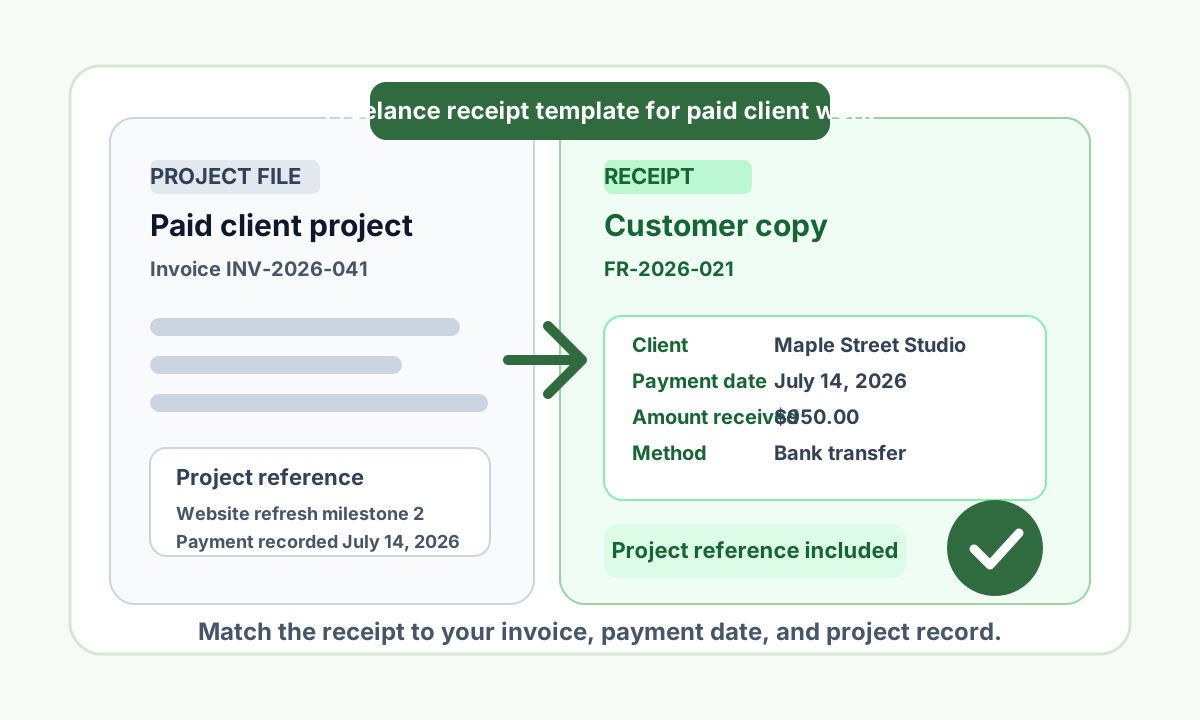
For example, a freelance designer might issue receipt FR-2026-021 after receiving the second milestone payment for a website refresh project. The receipt can show the invoice reference, amount paid, payment method, and the milestone that was completed.
| Receipt field | Example |
|---|---|
| Receipt number | FR-2026-021 |
| Client | Maple Street Studio |
| Project | Website refresh milestone 2 |
| Invoice reference | INV-2026-041 |
| Payment date | July 14, 2026 |
| Amount paid | $950.00 |
| Payment method | Bank transfer |
How to label deposits, retainers, and final payments
Freelance work often gets paid in stages. A deposit, retainer, or milestone receipt should name exactly what portion of the project the client paid for and whether more is still due.
That helps you avoid confusion later. The receipt should tell the same story as the invoice, contract, and payment record instead of acting like a replacement for them.
Deposit or retainer
State the amount received, payment date, project name, and that the payment covers an upfront deposit or retainer rather than the whole project.
Milestone payment
Name the completed milestone, match it to the related invoice or agreement, and list the exact amount paid for that stage.
Final balance
Mark the payment as the final balance only when your records show the project has been paid in full.
Invoice before receipt
If money has not arrived yet, stay with the invoice. Move to a receipt only after the payment is actually recorded.
A clean freelance receipt workflow
Start with the source record you already trust, such as the invoice, project tracker, signed agreement, payment processor entry, or manual ledger row. Use that record to fill the receipt so client names, service labels, and dates stay consistent.
Once the payment is confirmed, create the receipt, export the PDF, PNG, or JPG customer copy, and save it beside the invoice or project folder. That makes follow-up questions much easier to answer.
1. Confirm the payment
Check your bank transfer, card payment, cash log, or processor record before issuing the receipt.
2. Reuse the project reference
Carry over the invoice number, project title, milestone name, and paid amount from the source record.
3. Export the customer copy
Send a clean customer receipt with a unique receipt number and a short note that confirms the payment was received.
4. Archive everything together
Store the receipt with the invoice, contract, client thread, or project folder for future lookup.
Customer handoff and corrections
When you send the receipt, keep the message short. Mention the project, the amount received, and the payment date, then attach the customer copy and invite corrections if the billing contact or project label needs adjustment.
If you spot an error later, issue a corrected receipt that still points back to the same payment record. Do not create a replacement receipt that changes the history of a payment you already documented.
Keep the template tied to your own freelance work
Use this freelance receipt template only for work you actually sold, delivered, and were paid for. The receipt should match your own client record, payment record, and project context.
Do not use a receipt maker to document a transaction you did not handle, recreate a third-party purchase, or produce reimbursement, tax, insurance, chargeback, employment, school, or immigration proof.
Turn this guide into a receipt
Enter the sale details you control, review the fields, and export a customer PDF.
Open receipt maker
Receipt checklist before sending
- The client payment, deposit, or milestone is already recorded before you issue the receipt.
- The receipt number is unique inside your freelance records.
- Client name, project name, and invoice or agreement reference match the source record.
- Amount paid and payment date match the payment source exactly.
- Deposits, retainers, and partial payments are labeled clearly when the balance is not fully paid.
- The customer copy avoids sensitive bank or card details.
- The receipt is archived with the invoice, contract, or project folder.
FAQ
Can a freelancer send a receipt for a deposit or retainer?
Yes. Label the receipt as a deposit or retainer, show the amount received and payment date, and make it clear if part of the project balance is still unpaid.
Do I need both an invoice and a receipt for freelance work?
Often yes. Use the invoice to request payment and the receipt to confirm money was actually received. For very simple jobs, the receipt may be enough if a separate invoice was never needed and you still have a real payment record.
What payment details belong on the client copy of a freelance receipt?
Include the payment date, amount paid, payment method label, receipt number, and invoice or project reference. In most cases you should leave out full bank or card details from the customer copy.
How should I correct a freelance receipt if the project name or billing contact is wrong?
Issue a corrected copy that keeps the same payment context, then save it with the original source record so both versions still point to the same client payment.
Get Receipt Team
Receipt documentation and seller workflow guides.
Get Receipt writes for businesses that need clear customer receipts tied to legitimate sales, services, deposits, and internal payment records.
Related articles
Deposit receipt template for service businesses: fields and workflow
6 min read · July 7, 2026
Paid service call receipt checklist: fields to review before sending
6 min read · July 7, 2026
Contractor receipt after paid repair work: fields, notes, and handoff
7 min read · July 7, 2026